-
FrederikBaerentsen released this
2026-07-15 21:53:30 +02:00 | 0 commits to master since this releaseRead the full changelog here (https://gitea.baerentsen.space/FrederikBaerentsen/BrickTracker/src/branch/master/CHANGELOG.md#142)
This is a small patch release, mainly to fix instructions downloads breaking on Rebrickable.
Bug Fixes
Building Instructions
-
Fixed instructions downloads failing with "No instructions found on Rebrickable or Peeron" (Issue #171): Rebrickable now puts its site behind a Cloudflare challenge, which blocks the automated request before it can even find the instructions. Downloads now come from LEGO's own building-instructions page instead
-
Fixed instructions never linking to sets with alphanumeric ids (Issue #166): Pick a Brick and other promotional sets whose id starts with letters (e.g. EG00029-1) stayed orphaned in the instructions view even after manually uploading the PDF with the correct filename. Note: LEGO.com's own search doesn't have these sets, so instructions for them still have to be downloaded elsewhere and uploaded manually, this fix only ensures they link to the right set once you do
Version Display
- Fixed the version number still showing 1.4.0 after upgrading to 1.4.1 (Issue #170): The version number was never bumped when 1.4.1 was tagged, so
the frontpage kept reporting the old version. It now shows correctly 1.4.2 for this release.
Upgrade Path
No database migrations. No breaking changes from v1.4.1.
Update using latest tag:
If your
compose.yamlcontainsimage: gitea.baerentsen.space/frederikbaerentsen/bricktracker:latest, update with:# Pull the new version docker compose pull # Restart the container with the new image docker compose down docker compose up -dUpdate using version tag:
If your
compose.yamlspecifies a version, edit it and change the tag to1.4.2:image: gitea.baerentsen.space/frederikbaerentsen/bricktracker:1.4.2# Pull the new version docker compose pull # Restart the container with the new image docker compose down docker compose up -dDownloads
-
-
2026-06-14 10:09:02 +02:00 | 6 commits to master since this releaseNew Features
Read the full changelog here
Parts Table Filters
- Added per-column header filters to the Parts table on the set details page: The main Parts table now has an always-visible filter row under the column
headers- Name: case-insensitive search
- Color: dropdown populated from the colors present in the current results
- Missing / Damaged: All / With / Without dropdowns
- Checked: All / Checked / Unchecked
- Filters combine and re-evaluate live as you edit missing/damaged values or toggle checkboxes. Bulk actions (mark all missing, check all, etc.) only affect
the rows currently visible under the active filter. Per-minifigure tables stay sort-only.
Admin Modals
- "Reset to Defaults" confirmation now uses a Bootstrap modal instead of a browser dialog: Replaced the native browser
confirm()popup with a consistent Bootstrap modal matching the style of BrickTracker
Bug Fixes
Statistics
- Fixed prices on the Statistics page being rounded to whole numbers (Issue #146): All price values now display with two decimal places instead of whole numbers
- Fixed a price of
0being treated as no price (Issue #153): Setting a purchase price of0on sets, individual minifigures, or parts was indistinguishable from having no price set at all
Adding Sets & Minifigures
- Fixed purchase date, price, and notes not being saved when adding an individual minifigure (Issue #151): Filling in purchase date, price, or notes before clicking Add had no effect — only purchase location was saved
- Fixed purchase date and price not being stored correctly when adding an individual minifigure (Issue #151 follow-up): Purchase date and price were stored as raw strings instead of the correct types, causing them to be silently dropped from statistics
- Fixed previously added set being re-added when adding an individual minifigure (Issue #150): After adding a set, entering a
fig-ID and confirming would add the previous set again instead of the minifigure, if the user did not reload in between
Import & Refresh
- Fixed crash when importing sets containing minifigures or parts with no image on Rebrickable (Issue #149c): Adding or refreshing a set would fail entirely if any minifigure or part had no image URL
Admin Settings
- Fixed "Reset to Defaults" blanking all settings instead of restoring them (Issue #149a): "Reset to Defaults" was clearing all fields to empty/false instead of populating them with their actual default values
- Fixed
BK_INSTRUCTIONS_ALLOWED_EXTENSIONSbeing treated as a string instead of a list (Issue #149b): When saved via the admin panel, the setting was stored as a plain string rather than a list, causing it to iterate character by character
Wishlist
- Fixed deleting a wish with an owner assigned (Issue #152): Resolved a database constraint error when removing a set from the wishlist that had an owner assigned
Upgrade Path
No database migrations. No breaking changes from v1.4.0.
Update using
latesttag:If your
compose.yamlcontainsimage: gitea.baerentsen.space/frederikbaerentsen/bricktracker:latest, update with:# Pull the new version docker compose pull # Restart the container with the new image docker compose down docker compose up -dUpdate using version tag:
If your
compose.yamlspecifies a version, edit it and change the tag to1.4.1:image: gitea.baerentsen.space/frederikbaerentsen/bricktracker:1.4.1# Pull the new version docker compose pull # Restart the container with the new image docker compose down docker compose up -dDownloads
- Added per-column header filters to the Parts table on the set details page: The main Parts table now has an always-visible filter row under the column
-
2026-04-15 14:29:16 +02:00 | 24 commits to master since this releaseWarning
Database Migration RequiredVersion 1.4 includes database migrations from version 20 to version 27. There is NO automatic rollback. Once you upgrade, you cannot downgrade without restoring a backup.
Back up your database before upgrading:
- Option 1: Go to Admin -> Database and use the download button to save a copy of your database
- Option 2: Copy your data folder:
cp -r /path/to/your/data ./bricktracker-backup/data
See Migration Guide for detailed upgrade instructions.
Breaking Changes
BK_PARTS_DEFAULT_ORDERColumn Names ChangedThe
BK_PARTS_DEFAULT_ORDERenvironment variable now uses"combined"instead of"bricktracker_parts"for column references.Required updates if you have a custom value:
"bricktracker_parts"."spare"->"combined"."spare""bricktracker_parts"."part"->"combined"."part""bricktracker_parts"."quantity"->"combined"."quantity"
Or remove the custom setting entirely to use the new defaults. See
.env.samplefor the full list of available column names.New Features
Read the full changelog here
Individual Minifigures Tracking
Track loose minifigures outside of sets with full part-level tracking.
- Problem tracking (missing/damaged/checked states)
- Complete metadata: owners, tags, statuses, storage, purchase info
- Purchase tracking with date, location, and price
Feature Flags:
BK_HIDE_INDIVIDUAL_MINIFIGURES: hides navbar menu item and links from minifigure detail pages; routes remain accessibleBK_DISABLE_INDIVIDUAL_MINIFIGURES: read-only mode; all pages accessible but editing fields disabled, delete buttons hidden, write operations blocked
Individual Parts Tracking
Track loose parts outside of sets and minifigures.
- Quick-add directly from set parts tables
- Complete metadata: owners, tags, statuses, storage, purchase info
- Purchase tracking with date, location, and price
- Bulk part addition interface
Feature Flags:
BK_HIDE_INDIVIDUAL_PARTS: hides navbar menu item, "Add Parts" button, and links from part detail pages; routes remain accessibleBK_DISABLE_INDIVIDUAL_PARTS: read-only mode; all pages accessible but editing fields disabled, delete buttons hidden, "Add Parts" menu item removed, write operations blockedBK_HIDE_QUICK_ADD_INDIVIDUAL_PARTS: hides the "Add to individual parts" option in set parts row menus only
Part Lots System
Organize individual parts into lots/collections:
- Group related parts under a named lot (e.g. a bulk purchase, a project)
- Shared metadata across the lot (storage, purchase info)
- View and filter all parts within a lot
- Lot-level metadata: name, description, created date
Purchase Location Management
- New purchase location management page at
/purchase-locations/ - View all items purchased from a given location
Export Functionality
New export section in the Admin panel with three categories:
Export Sets:
- Rebrickable CSV format for collection tracking
Export All Parts:
- Rebrickable CSV (Part, Color, Quantity)
- LEGO Pick-a-Brick CSV (Element ID, Quantity)
- BrickLink XML (Wanted List format)
Export Missing/Damaged Parts:
- Same three formats as All Parts
All exports aggregate quantities automatically. BrickLink exports use proper BrickLink part numbers and color IDs when available (sourced from the Rebrickable color cache).
NOT Filter Toggle Buttons
Toggle any filter between "equals" and "not equals" mode:
- Works with all filter types: Status, Theme, Owner, Storage, Purchase Location, Tag, Year
- Visual feedback: button turns red with
≠icon when in NOT mode - Supports both client-side and server-side pagination modes
- Filter state persists in the URL (e.g.
?theme=-frozen&status=-has-missing) - Clear filters button resets all toggle states
Notes / Comments Field
Add text notes and comments to any set:
- Accessible via Management -> Notes accordion on set detail pages
- Auto-save functionality with visual feedback
- Clear button to quickly remove notes
- Supports multi-line text input
Configuration:
BK_SHOW_NOTES_GRID(default:false): show notes on set cards in grid viewBK_SHOW_NOTES_DETAIL(default:true): show notes on set detail pages- Both settings can be toggled in Admin -> Live Settings without restart
Bulk Set Refresh
Batch refresh functionality for updating multiple sets at once:
- New Bulk Refresh button on Admin -> Sets needing refresh
- Pre-populates a comma-separated list of all sets needing refresh
- Follows same pattern as bulk add with real-time progress tracking
- Shows current set being processed; failed sets remain in input for easy retry
Badge Order Customization
Configurable badge ordering for set cards and detail pages:
BK_BADGE_ORDER_GRID: comma-separated badge keys for grid view (default:theme,year,parts,total_minifigures,owner)BK_BADGE_ORDER_DETAIL: comma-separated badge keys for detail view (default: all 16 badges)- Both settings configurable via
.envor Admin -> Live Settings without restart
16 available badge types:
theme,tag,year,parts,instance_count,total_minifigures,total_missing,total_damaged,owner,storage,purchase_date,purchase_location,purchase_price,instructions,rebrickable,bricklinkSortable Checked Column (Issue #137)
- The "Checked" column in set inventory tables can now be sorted by clicking the header
- Works in both the parts table and the part lots table
Front Page Parts Display
- Added latest/random parts section to the front page alongside sets and minifigures
- Shows 6 parts with quantity badges and relevant information
- Respects
BK_RANDOM,BK_HIDE_SPARE_PARTS, andBK_HIDE_ALL_PARTSconfiguration
Rebrickable Color Database
- Caches color information from Rebrickable API locally
- Provides BrickLink color ID mapping for exports
- Reduces repeated API calls for color data
Bug Fixes
Parts & Sorting
- Fixed client-side table sorting corruption (Issue #136, #145): Sort buttons now trigger actual table header clicks instead of using
columns.sort()directly- Prevents misaligned images, colors, and links when mixing sort buttons with header clicks
- Applies to
/parts,/problems, and/minifigurespages
Set Refresh
- Fixed set refresh functionality: Resolved multiple issues with refreshing sets from Rebrickable
- Reuses existing set IDs instead of generating new UUIDs, preventing foreign key errors
- Uses UPDATE-then-INSERT pattern to properly update existing parts while preserving user tracking data (
checked,missing,damaged) - Part quantities now correctly sync with Rebrickable during refresh
- New parts from Rebrickable are added; orphaned parts (no longer in Rebrickable's inventory) are removed
Networking
- Fixed Socket.IO connections behind reverse proxies: Resolved WebSocket disconnection issues with Traefik, Nginx, and other reverse proxies
- Root cause: setting
BK_DOMAIN_NAMEenables strict CORS checking that fails with reverse proxies - Solution: leave
BK_DOMAIN_NAMEempty for reverse proxy deployments (allows all origins by default) - Added debug logging for Socket.IO connections to help troubleshoot proxy issues
- Root cause: setting
Import & Bulk Operations
- Fixed bulk import hanging on empty set numbers: Trailing commas in bulk import input (e.g.
"10312, 21348, ") no longer cause infinite loops- Empty strings from trailing commas are now filtered out before processing
- Fixed bulk parts redirect: Corrected endpoint reference after route function rename
Admin & Storage
- Fixed storage deletion error handling: Added proper validation when attempting to delete storage locations still in use
- Shows detailed count of items using the storage (sets, individual minifigures, individual parts, part lots)
- Provides clickable link to storage details page
- Fixed purchase location templates: Created missing template files for purchase location pages
Docker
- Fixed permission denied when running as non-root user (Issue #138): Resolved container startup failure when using
user:directive in docker-compose- Added
chmod -R a+rX /appto Dockerfile so all files are readable regardless of build environment - Added commented
user:example incompose.yamlto document non-root support
- Added
Configuration Updates
New Environment Variables
Individual Features:
BK_HIDE_INDIVIDUAL_MINIFIGURES(default:false): hide individual minifigures UI elementsBK_DISABLE_INDIVIDUAL_MINIFIGURES(default:false): read-only mode for individual minifiguresBK_HIDE_INDIVIDUAL_PARTS(default:false): hide individual parts UI elementsBK_DISABLE_INDIVIDUAL_PARTS(default:false): read-only mode for individual partsBK_HIDE_QUICK_ADD_INDIVIDUAL_PARTS(default:false): hide quick-add option in set parts tables
Notes:
BK_SHOW_NOTES_GRID(default:false): show set notes on grid view cardsBK_SHOW_NOTES_DETAIL(default:true): show set notes on set detail pages
Badge Order:
BK_BADGE_ORDER_GRID(default:theme,year,parts,total_minifigures,owner): badge order on set cardsBK_BADGE_ORDER_DETAIL(default: all 16 badges): badge order on set detail pages
All new settings support live configuration updates via Admin -> Live Settings without a container restart.
Database
7 new migrations (v20 -> v27):
- 0021: Individual minifigures and parts tables
- 0022: Part lots system with proper foreign keys
- 0023: Performance indexes for individual features
- 0024: Rebrickable colors cache table
- 0025: Additional composite indexes for query optimization
- 0026: Standardized
ON DELETE RESTRICTbehavior across metadata tables - 0027: Consolidated metadata tables. Removes FK constraints to allow reuse across sets, individual minifigures, individual parts, and lots
Upgrade Path
From 1.3.x to 1.4
- Back up your database (see warning above)
- Update your image tag to
1.4.0 - Restart. The application will prompt you to run the database upgrade from the Admin page
- If you have a custom
BK_PARTS_DEFAULT_ORDER, update it as described in Breaking Changes
Update using
latesttag:If your
compose.yamlcontainsimage: gitea.baerentsen.space/frederikbaerentsen/bricktracker:latest, update with:# Pull the new version docker compose pull # Restart the container with the new image docker compose down docker compose up -dUpdate using version tag:
If your
compose.yamlspecifies a version, edit it and change the tag to1.4.0:image: gitea.baerentsen.space/frederikbaerentsen/bricktracker:1.4.0# Pull the new version docker compose pull # Restart the container with the new image docker compose down docker compose up -dDownloads
-
2025-12-20 21:47:26 +01:00 | 91 commits to master since this releaseWarning
Breaking ChangesVersion 1.3 introduces breaking changes to the default data folder structure and minifigures path.
Migration Required for Existing Installations:
- All user data now consolidated into single
data/folder for easier backup and Docker volume mapping - Default minifigures folder changed from
minifigstominifigures - Configuration file can now be stored in
data/.env(recommended) or.env(backward compatible)
See Migration Guide for detailed upgrade instructions.
New Functionality
- Database Integrity Check and Cleanup
- Added database integrity scanner to detect orphaned records and foreign key violations
- New "Check Database Integrity" button in admin panel scans for issues
- Detects orphaned sets, parts, and parts with missing set references
- Warning prompts users to backup database before cleanup
- Cleanup removes all orphaned records in one operation
- Detailed scan results show affected records with counts and descriptions
- Database Optimization
- Added "Optimize Database" button to re-create performance indexes
- Safe to run after database imports or restores
- Re-creates all indexes from migration #19 using
CREATE INDEX IF NOT EXISTS - Runs
ANALYZEto rebuild query statistics - Runs
PRAGMA optimizefor additional query plan optimization - Helpful after importing backup databases that may lack performance optimizations
Bug Fixes
- Fixed foreign key constraint errors during set imports: Resolved
FOREIGN KEY constraint failederrors when importing sets with parts and minifigures- Fixed insertion order in
bricktracker/part.py: Parent records (rebrickable_parts) now inserted before child records (bricktracker_parts) - Fixed insertion order in
bricktracker/minifigure.py: Parent records (rebrickable_minifigures) now inserted before child records (bricktracker_minifigures) - Ensures foreign key references are valid when SQLite checks constraints
- Fixed insertion order in
- Fixed set metadata updates: Owner, status, and tag checkboxes now properly persist changes on set details page
- Fixed
update_set_state()method to commit database transactions (was using deferred execution without commit) - All metadata updates (owner, status, tags, storage, purchase info) now work consistently
- Fixed
- Fixed nil image downloads: Placeholder images for parts and minifigures without images now download correctly
- Removed early returns that prevented nil image downloads
- Nil images now properly saved to configured folders (e.g.,
/app/data/parts/nil.jpg)
- Fixed error logging for missing files: File not found errors now show actual configured folder paths instead of just URL paths
- Added detailed logging showing both file path and configured folder for easier debugging
- Fixed minifigure filters in client-side pagination mode: Owner and other filters now work correctly when server-side pagination is disabled
- Aligned filter behavior with parts page (applies filters server-side, then loads filtered data for client-side search)
Update using
latesttag:If your
compose.yamlcontainsimage: gitea.baerentsen.space/frederikbaerentsen/bricktracker:latest, update with:# Pull the new version docker compose pull # Restart the container with the new image docker compose down docker compose up -dUpdate using version-tag:
If your
compose.yamlspecifies a version likeimage: gitea.baerentsen.space/frederikbaerentsen/bricktracker:1.3:Edit your
compose.yamland change the version to1.3.1:image: gitea.baerentsen.space/frederikbaerentsen/bricktracker:1.3.1# Pull the new version docker compose pull # Restart the container with the new image docker compose down docker compose up -dDownloads
- All user data now consolidated into single
-
2025-12-18 02:01:15 +01:00 | 103 commits to master since this releaseWarning
Breaking ChangesVersion 1.3 introduces breaking changes to the default data folder structure and minifigures path.
Migration Required for Existing Installations:
- All user data now consolidated into single
data/folder for easier backup and Docker volume mapping - Default minifigures folder changed from
minifigstominifigures - Configuration file can now be stored in
data/.env(recommended) or.env(backward compatible)
See Migration Guide for detailed upgrade instructions.
Breaking Changes
Data Folder Consolidation
Version 1.3 consolidates all user data into a unified
data/folder structure:Previous Structure:
/app/ ├── app.db ├── .env ├── themes.csv ├── retired_sets.csv └── static/ ├── sets/ ├── parts/ ├── minifigs/ └── instructions/New Structure (v1.3):
/app/ └── data/ ├── .env (optional, recommended) ├── app.db ├── themes.csv ├── retired_sets.csv ├── sets/ ├── parts/ ├── minifigures/ └── instructions/Benefits:
- Single Docker volume mount for all user data
- Simplified backup (one folder contains everything)
- Configuration persistence via
data/.env - Cleaner separation of code vs. data
Migration Options:
- Migrate to new structure (recommended) - Single volume for all data including .env
- Keep current setup (backward compatible) - Old paths continue to work
Configuration File Location
- New recommended location:
data/.env(included in data volume, admin panel changes persist) - Backward compatible:
.envin root still works (requires separate volume mount) - Priority:
data/.env>.env(automatic detection)
Minifigures Folder Rename
Default minifigures folder changed from
minifigstominifiguresfor consistency.- Users who relied on default (without explicit
BK_MINIFIGURES_FOLDERconfig) need to either:- Set
BK_MINIFIGURES_FOLDER=minifigsto maintain existing behavior, or - Rename existing
minifigsfolder tominifigures
- Set
- No impact if
BK_MINIFIGURES_FOLDERalready explicitly configured
New Features
Read the full changelog here
New Logo
Logo has changed from a generic brick to a BrickTracker custom logo. This was done to avoid attribution issues.
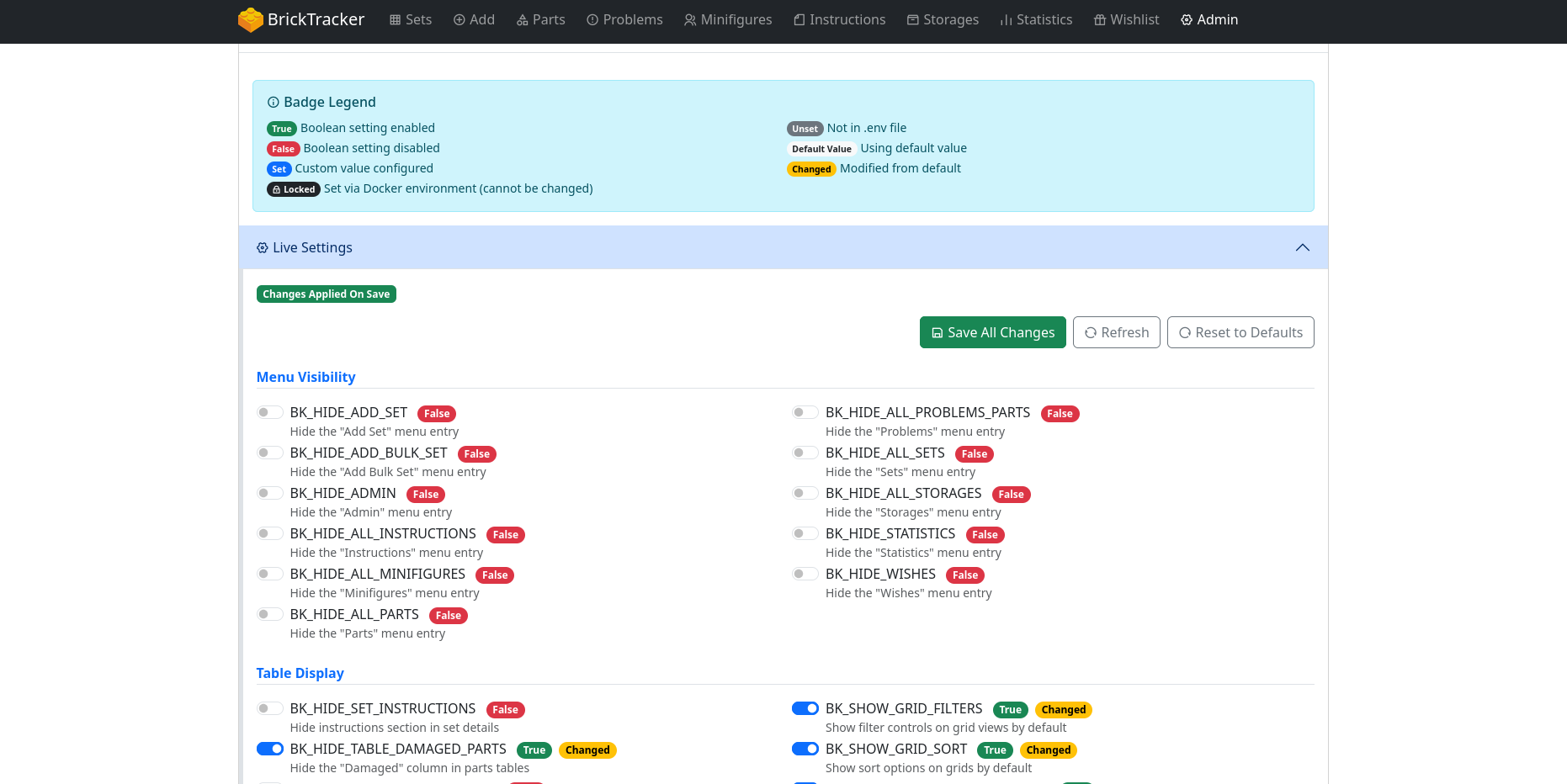
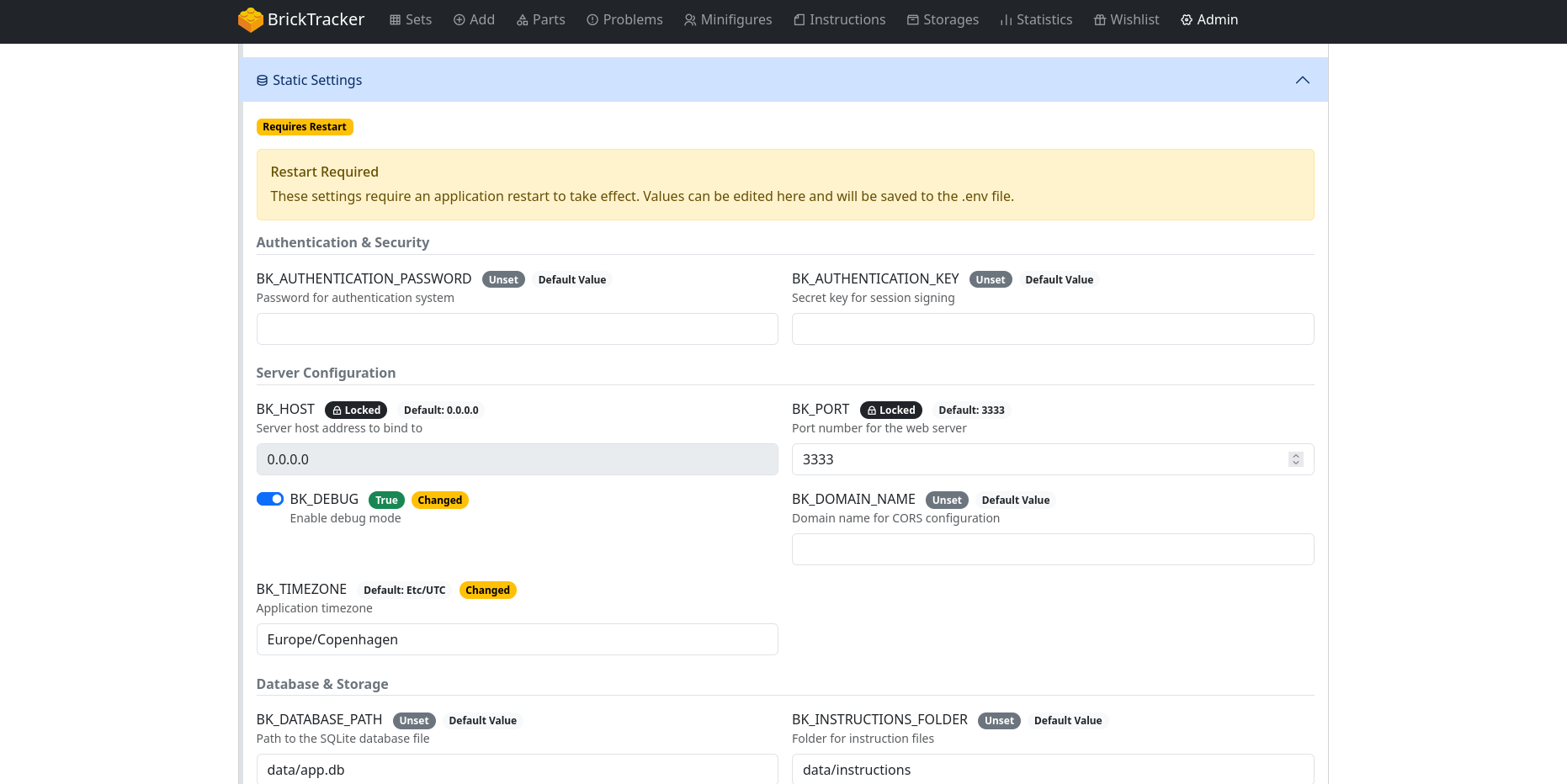
Live Settings Management
Complete admin panel overhaul for configuration management:
Live Settings (No Restart Required):
- Menu visibility toggles
- Table column display options
- Pagination settings
- Feature flags (consolidation, dark mode, etc.)
Static Settings (Restart Required):
- Authentication credentials
- API keys
- Database paths
- Server configuration
Advanced Features:
- Badge system showing value status (True/False, Set/Default/Unset)
- Changed indicator for modified values
- Lock detection for Docker environment variables
- Persistence warnings (shows if using non-persistent .env location)
All changes are saved to
data/.env.Dark Mode Support
Native Bootstrap 5.3 dark mode implementation:
- Toggle via
BK_DARK_MODEenvironment variable - Live-changeable in Admin > Live Settings
- Persistent across sessions
- System-wide consistent theming
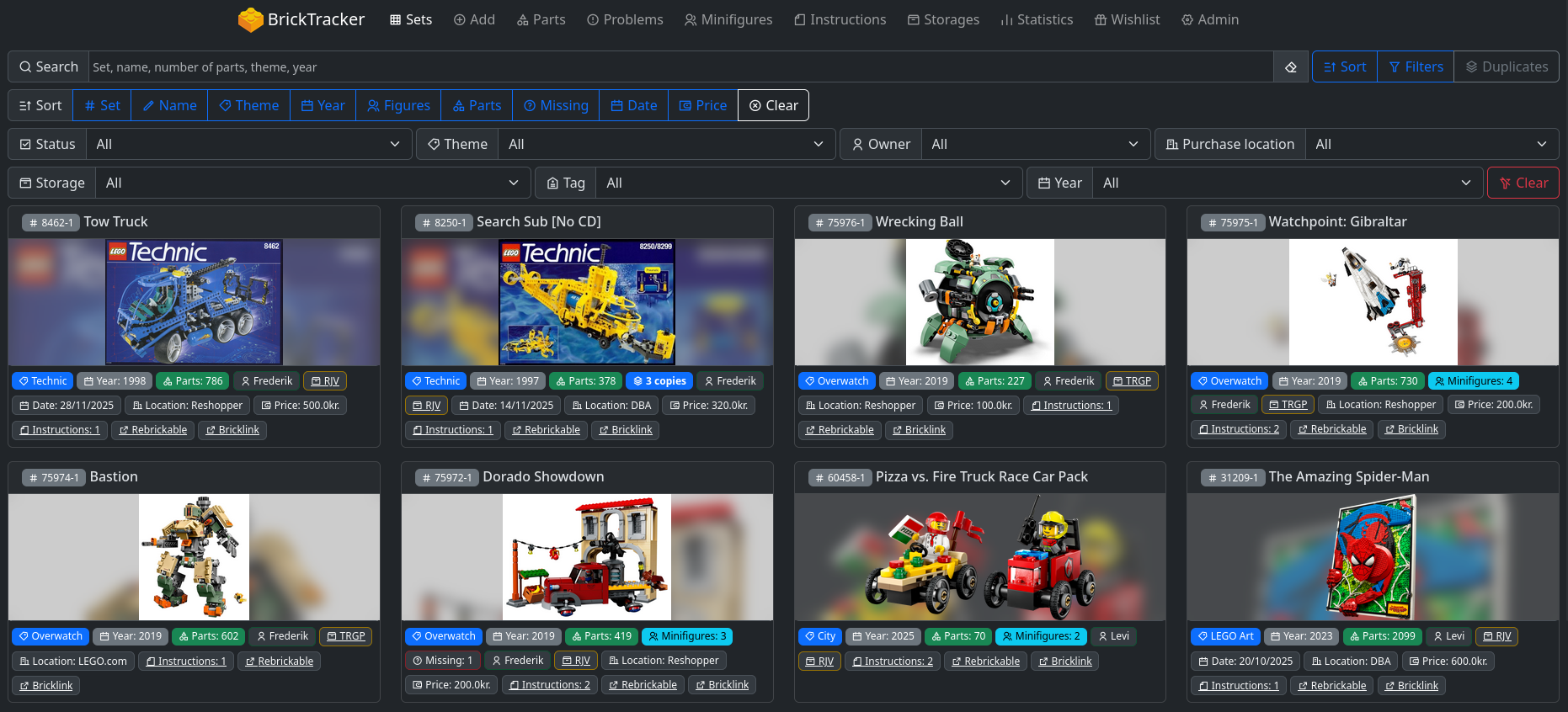
Set Consolidation & Grouping
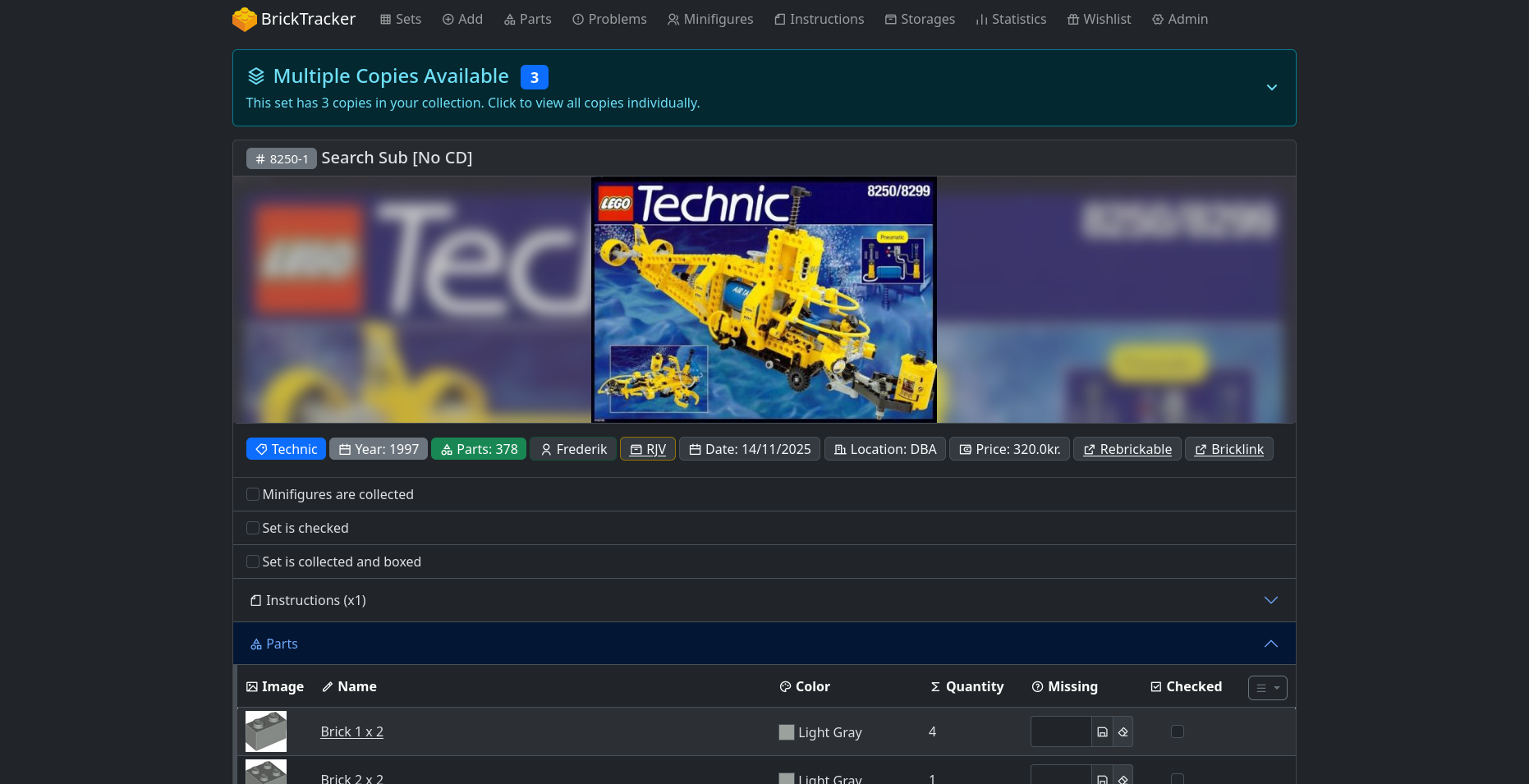
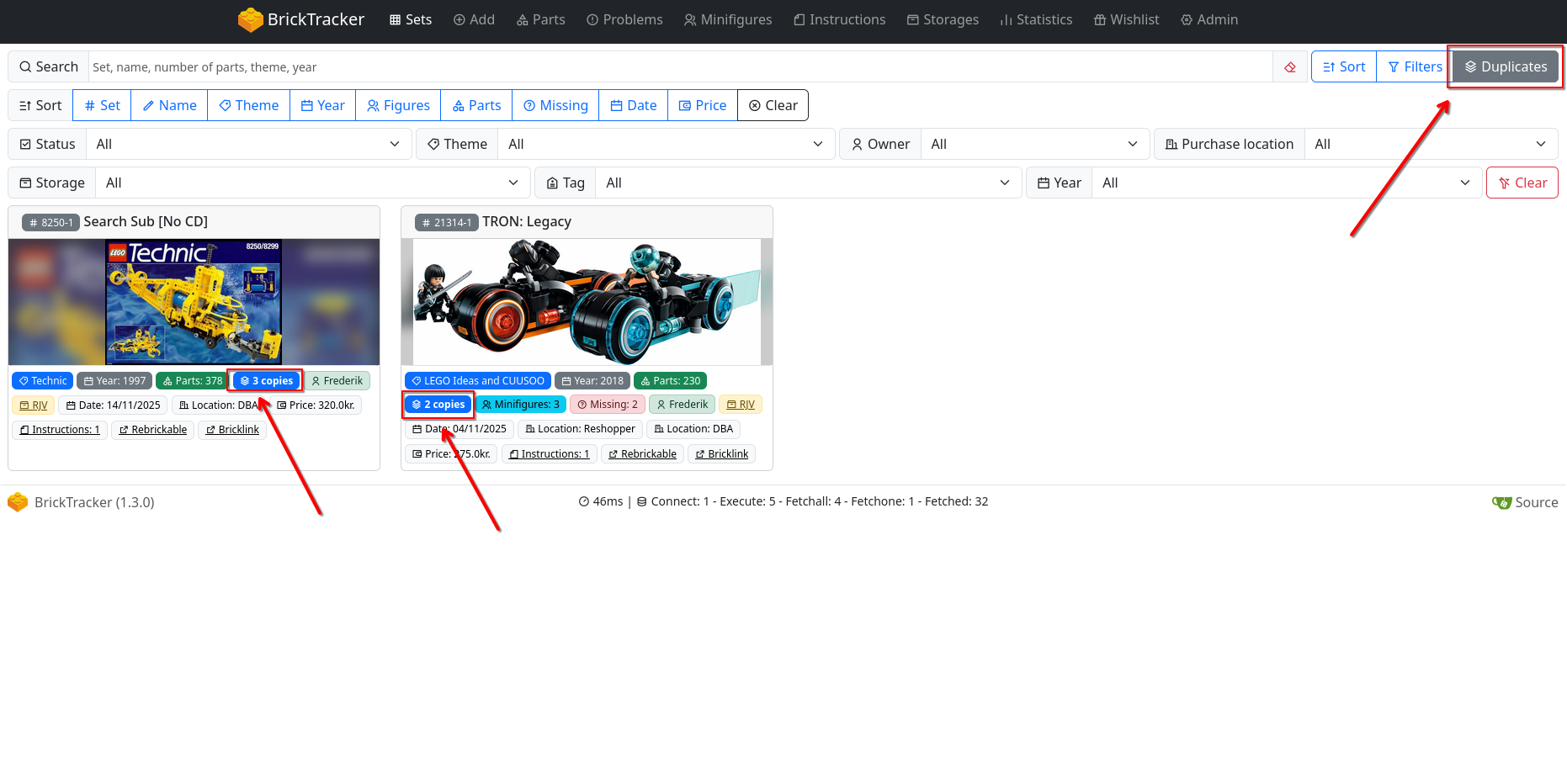
Duplicate set management:
Features:
- Automatic grouping of duplicate sets on main sets page
- Instance count badges (e.g., "3 copies")
- Expandable drawer to view individual set copies
- Full set cards for each instance with all badges and functionality
- Mixed status indicators (unchecked/partial/checked)
- Duplicate sets filter button
- Controlled via
BK_SETS_CONSOLIDATION(default: false)
Smart Filtering:
BK_SHOW_SETS_DUPLICATE_FILTERto show/hide filter button- Works with both server-side and client-side pagination
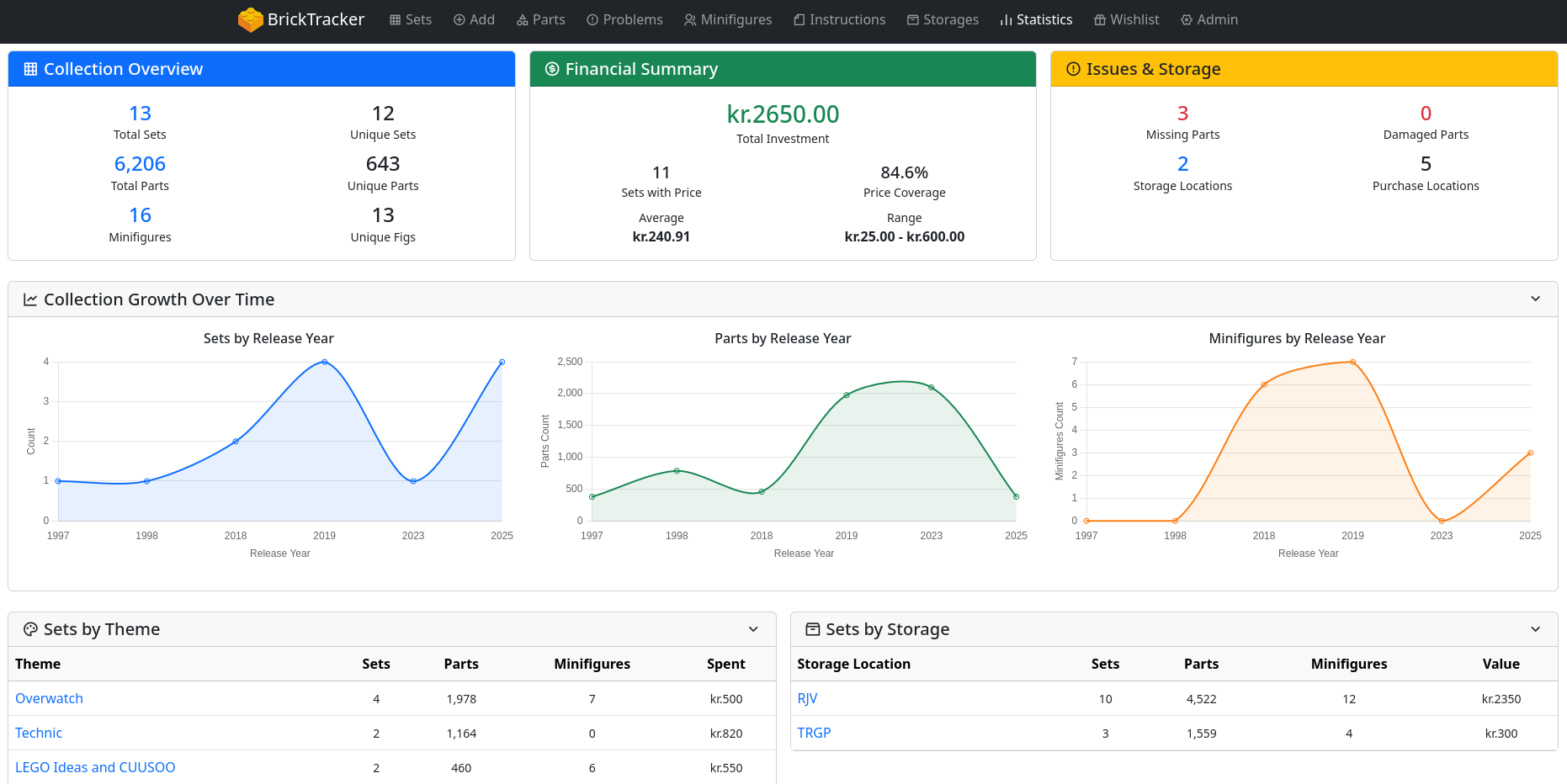
Statistics Page
New Statistics page with complete collection analytics:
Financial Overview:
- Total collection cost
- Average price per set
- Price range analysis
- Investment tracking over time
Collection Metrics:
- Total sets count (with duplicates)
- Unique sets count
- Total parts inventory
- Total minifigures count
Analytics Dashboards:
- Theme distribution with clickable drill-down
- Storage location statistics with value calculations
- Purchase location analytics with spending patterns
- Year-based analytics (release years and purchase years)
- Problem tracking (missing/damaged parts)
Interactive Features:
- Clickable numbers filter to relevant sets
- Collection growth charts (line charts over time)
- Collapsible sections for organized viewing
- Configuration via
BK_STATISTICS_SHOW_CHARTSandBK_STATISTICS_DEFAULT_EXPANDED
Access Control:
BK_HIDE_STATISTICSto hide from menu- Requires authentication if enabled
Pagination System
Individual pagination control per entity type:
Per-Entity Configuration:
BK_SETS_SERVER_SIDE_PAGINATIONBK_PARTS_SERVER_SIDE_PAGINATIONBK_MINIFIGURES_SERVER_SIDE_PAGINATIONBK_PROBLEMS_SERVER_SIDE_PAGINATION
Device-Specific Settings:
- Desktop pagination sizes
- Mobile pagination sizes
- Configurable per entity type
Features:
- Search, filtering, and sorting in both modes
- Mobile-friendly navigation
- Consistent experience across all pages
Spare Parts Control
Flexible spare parts management:
BK_SKIP_SPARE_PARTS: Skip importing spare parts from Rebrickable (not saved to database)BK_HIDE_SPARE_PARTS: Hide spare parts from displays (must be in database)- Independent or combined usage
- Live-changeable in admin panel
- Affects all parts displays
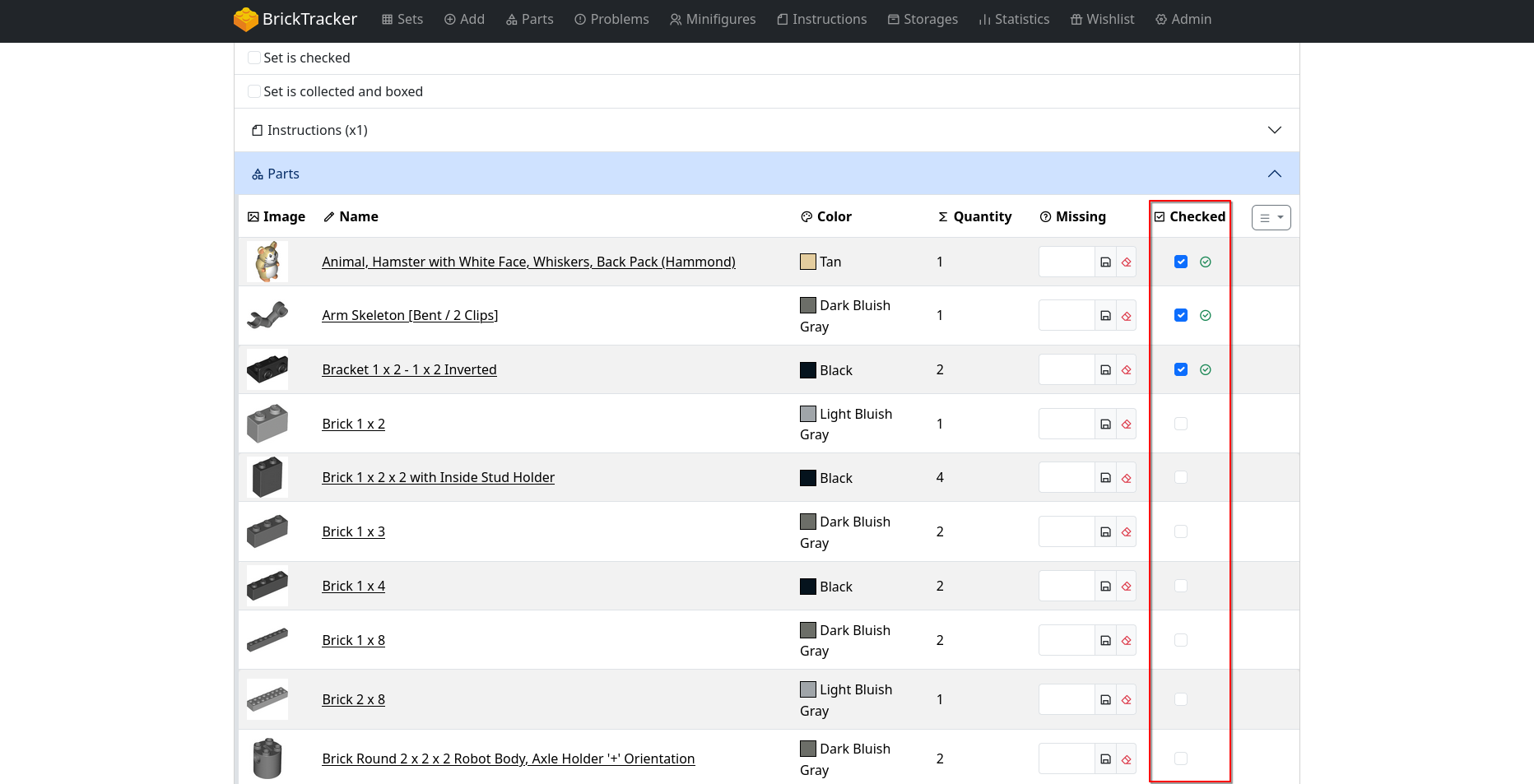
Parts Inventory System
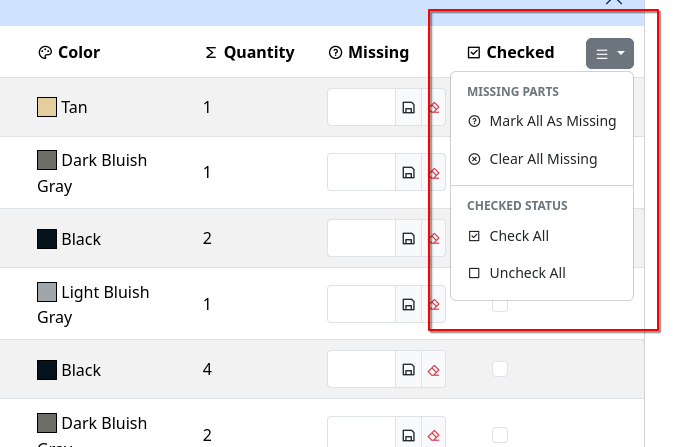
Track verification progress during set walkthroughs:
- New "Checked" column in parts tables
- Checkboxes to mark parts as verified
BK_HIDE_TABLE_CHECKED_PARTSto hide column- Useful for building/sorting sets
Peeron Instructions Integration
Alternative instruction source when Rebrickable unavailable:
Features:
- Full image caching system
- Automatic thumbnail generation
- Optimized HTTP calls (download once, generate locally)
- Automatic cache cleanup after PDF generation
- Rate limiting to respect Peeron servers
BrickLink Set Links
Extended BrickLink integration:
- BrickLink badge links on set cards and details pages
- Appears alongside existing Rebrickable links
BK_BRICKLINK_LINK_SET_PATTERNfor URL customization- Default:
https://www.bricklink.com/v2/catalog/catalogitem.page?S={set_num} - Controlled by existing
BK_BRICKLINK_LINKSvariable
Alphanumeric Set Numbers
Support for special edition and promotional sets:
- Database schema updated (INTEGER → TEXT)
- Supports sets with letters in numbers
- Examples: "McDR6US-1", "COMCON035-1", "EG00021-1"
Admin Page Customization
Configurable section expansion:
BK_ADMIN_DEFAULT_EXPANDED_SECTIONSenvironment variable- Comma-separated list of section names
- Valid sections: authentication, instructions, image, theme, retired, metadata, owner, purchase_location, status, storage, tag, database
- URL parameters take priority
- Database section expanded by default
Mobile & Network Improvements
WebSocket/Socket.IO Reliability:
- Polling-first strategy with automatic WebSocket upgrade
- 30-second connection timeout for slow mobile networks
- Ping/pong keepalive (30s timeout, 25s interval)
- Enhanced server-side connection logging
Bug Fixes & Enhancements
Instructions
- Fixed Rebrickable instruction downloads (removed cloudscraper dependency)
- Fixed "Open PDF" button links to use correct data route
- Corrected path resolution for
data/instructionsfolder - Fixed instruction listing to scan correct location
- Fixed Peeron PDF creation paths
Sets & Data Handling
- Fixed foreign key constraint errors when adding sets
- Atomic transaction handling for set downloads
- All-or-nothing database operations (prevents partial additions)
- Default image handling for sets without images (automatic nil.png fallback)
- Alphanumeric set number support
UI/UX
- Fixed dynamic sort icons across all pages
- Enhanced color dropdown (automatic duplicate merging)
- Improved DataTable integration with server-side pagination
- Disabled column header sorting when server-side pagination enabled
- Better search behavior (instant for client-side, Enter for server-side)
- Mobile-friendly pagination navigation
- Improved theme filtering (handles duplicate names)
- Fixed set number sorting (proper numeric sorting)
Configuration & Admin
- Fixed environment variable lock detection after saving
- Variables from
data/.envor root.envshown as editable - Docker environment variables remain properly locked
- Configuration persistence warnings in admin panel
Configuration Updates
New Environment Variables
Live Settings:
BK_DARK_MODE- Enable dark mode theme (default: false)BK_SETS_CONSOLIDATION- Enable set grouping (default: false)BK_SKIP_SPARE_PARTS- Skip importing spare parts (default: false)BK_HIDE_SPARE_PARTS- Hide spare parts from display (default: false)BK_HIDE_TABLE_CHECKED_PARTS- Hide checked column (default: false)BK_SHOW_SETS_DUPLICATE_FILTER- Show duplicate filter button (default: true)
Pagination:
BK_SETS_SERVER_SIDE_PAGINATION- Enable server-side pagination for setsBK_PARTS_SERVER_SIDE_PAGINATION- Enable server-side pagination for partsBK_MINIFIGURES_SERVER_SIDE_PAGINATION- Enable server-side pagination for minifiguresBK_PROBLEMS_SERVER_SIDE_PAGINATION- Enable server-side pagination for problems- Device-specific sizes:
*_PAGINATION_SIZE_DESKTOP,*_PAGINATION_SIZE_MOBILE
Statistics:
BK_HIDE_STATISTICS- Hide statistics menu item (default: false)BK_STATISTICS_SHOW_CHARTS- Show collection growth charts (default: true)BK_STATISTICS_DEFAULT_EXPANDED- Default section state (default: true)
Admin:
BK_ADMIN_DEFAULT_EXPANDED_SECTIONS- Comma-separated list of sections to expand
BrickLink:
BK_BRICKLINK_LINK_SET_PATTERN- BrickLink set URL pattern
Paths (Data Consolidation):
- All path variables now support
data/folder structure - Backward compatible with old paths
Docker Updates
Compose File Changes:
- Simplified volume mapping (single
data/volume recommended) - Updated default paths in example compose files
- Environment variable handling improved
Example Docker Compose (v1.3):
services: bricktracker: image: your-bricktracker-image:1.3 volumes: - ./data:/app/data # Single volume for all user data environment: - BK_REBRICKABLE_API_KEY=your_api_key ports: - "3333:3333"Documentation Updates
BrickTracker.baerentsen.space is now the new location for documentation and guides. Check out What is BrickTracker? for a quick intro to BrickTracker (with screenshots) or Quick Start to get started.
New Documentation:
- Migration Guide - Comprehensive v1.3 upgrade instructions
- Overview - Quick overview of BrickTracker
- Complete Environment Variables Guide - All variables with examples
Improved Documentation:
- Better examples for database ordering options
- Docker deployment guides updated
- Quick start guide updated for v1.3
Upgrade Path
From 1.2.x to 1.3
Option 1: Migrate to New Structure (Recommended)
- Backup your current installation
- Follow the Migration Guide
- Move data to new
data/folder structure - Update Docker compose volumes
- Restart application
Option 2: Keep Current Structure (Backward Compatible)
- Update to v1.3
- Set explicit paths in
.envfor old locations - Application will work with existing structure
Both options preserve all data and settings.
Screenshots


Downloads
- All user data now consolidated into single
-
2025-09-16 10:52:45 +02:00 | 226 commits to master since this releaseBrickTracker Release 1.2.4 - Enhanced BrickLink Integration
Warning
To use the new BrickLink color parameter in URLs, update your .env file:
BK_BRICKLINK_LINK_PART_PATTERN=https://www.bricklink.com/v2/catalog/catalogitem.page?P={part}&C={color}New Features
- BrickLink Data Storage - Parts now store BrickLink color IDs, color names, and part numbers from Rebrickable API
- Enhanced BrickLink URLs - Part links now include accurate BrickLink part numbers and color parameters for precise catalog navigation
- Smart URL Fallback - Automatic fallback from BrickLink to Rebrickable data when BrickLink mappings are unavailable
- Admin Refresh Tracking - Set refresh page now detects and displays missing BrickLink data alongside existing checks
Database Enhancements
- Migration 0016 - Added bricklink_color_id and bricklink_color_name columns to rebrickable_parts table
- Migration 0017 - Added bricklink_part_num column to rebrickable_parts table
- Enhanced API Integration - Rebrickable API calls now automatically extract BrickLink mappings from external_ids.BrickLink data
- Improved Data Completeness - Admin tools now track and report missing BrickLink data for better collection management
UI/UX Enhancements
- BrickLink Issues Column - Single column showing total count of missing BrickLink data per set
- Streamlined Refresh Workflow - Existing refresh process now handles both Rebrickable and BrickLink data gaps
Affected Pages
- Part Details - BrickLink URLs now use accurate part numbers and include color parameters
- /admin/set/refresh - Enhanced with BrickLink data completeness tracking
- All Part Links - Improved accuracy for BrickLink catalog navigation across the application
Screenshots
Downloads
-
2025-09-16 10:21:58 +02:00 | 230 commits to master since this releaseBrickTracker Release - Enhanced Filtering & Search
New Features
- Owner filtering added to /minifigures page - filter minifigures by set owner
- Color filtering added to /parts page - filter parts by LEGO color with visual color indicators
- Filter state persistence - filters stay open when making selections for better user experience
UI/UX Enhancements
- Consistent interface design - parts and minifigures pages now use the same search/filter layout as sets
- Smart UI visibility - filter buttons automatically hide when not needed (e.g., when only one owner exists)
- Improved search functionality - enhanced search with better integration across filtered results
Database Enhancements
- Dynamic filtering queries - efficient SQL queries for owner and color-based filtering
- Optimized search performance - better search handling for filtered datasets
Affected Pages
- /parts - Added color filtering, enhanced search interface and sort options
- /minifigures - Added owner filtering, enhanced search interface and sort options
Screenshots
Downloads
-
2025-02-06 20:32:43 +01:00 | 245 commits to master since this releaseBrickTracker 1.2.0
BrickTracker version 1.2.0 introduces better metadata support, improved part management, and enhanced UI controls. This release focuses on better organization through new storage features, purchase tracking, and ownership management.
How to Update
Assuming you are using Docker Compose to run BrickTracker, the update process depends on how you've configured your image tag.
Using latest tag
If your compose.yaml contains
image: gitea.baerentsen.space/frederikbaerentsen/bricktracker::latest, update with:# Pull the new version docker compose pull # Restart the container with the new image docker compose down docker compose up -dUsing version tag
If your compose.yaml specifies a version like
image: gitea.baerentsen.space/frederikbaerentsen/bricktracker::1.1.1:- Edit your compose.yaml and change the version to
1.2.0 - Run the following commands:
# Pull the new version
docker compose pull

# Restart the container with the new image
docker compose down
docker compose up -d
After updating, you'll be prompted to upgrade the database as described in the Database Upgrade section below.
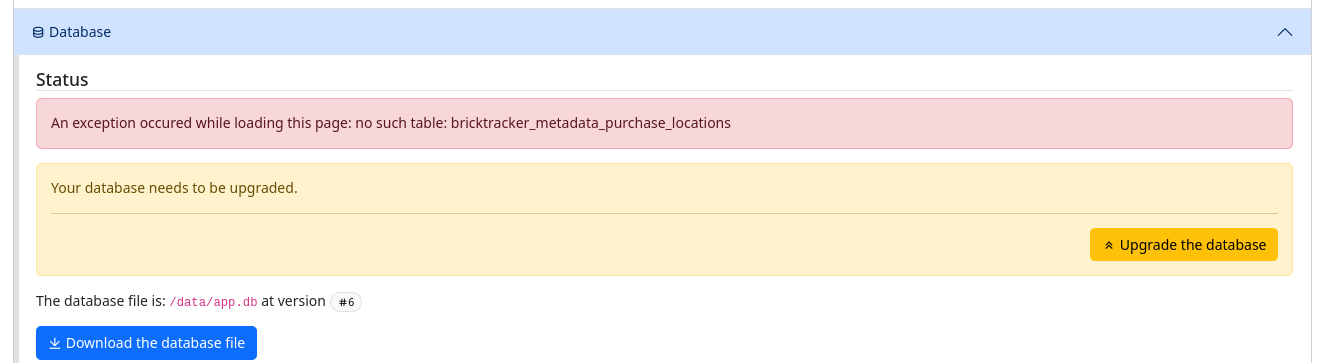
Database Upgrade Required
On first launch, you'll need to upgrade the database:
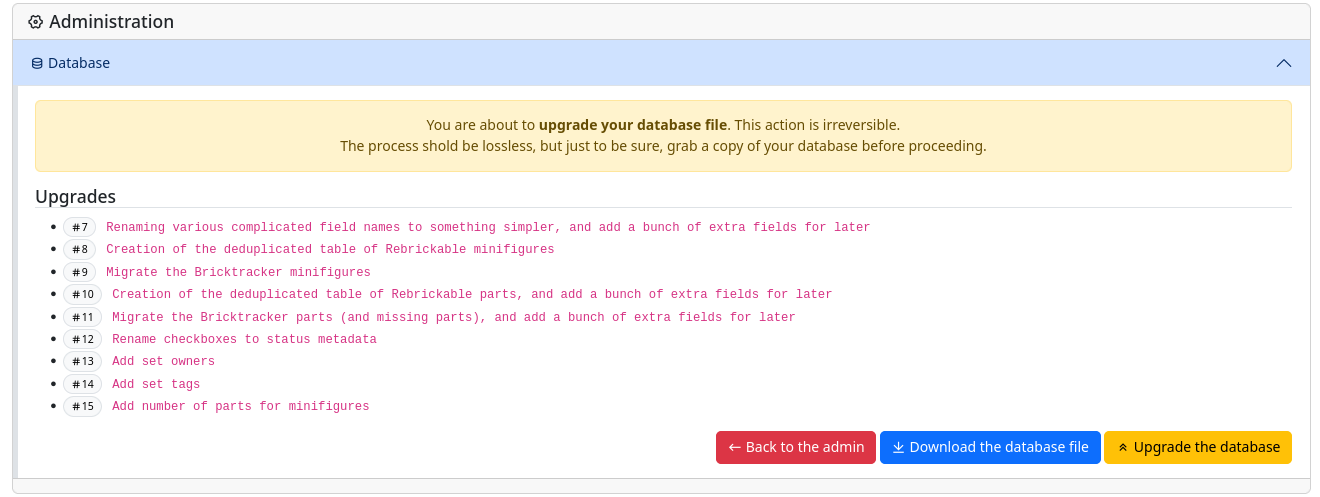
- Click "Administration" when prompted
- Click "Upgrade the database"
- Download a backup of your database (strongly recommended)
- Click "Upgrade the Database" to complete the process

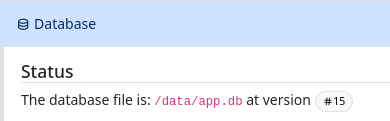
Your database version should now be at version 15 (location may vary based on your settings):
Major Features
Important Notes
⚠️ The "Missing" feature has been renamed to "Problems" to accommodate both missing and damaged parts. Related environment variables have been updated accordingly.
Metadata System
It is now possible to add additional information to each set:
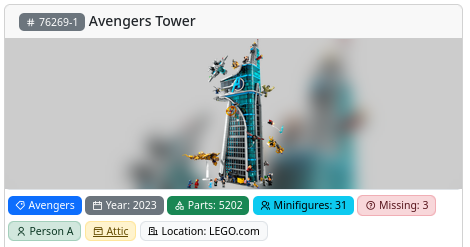
- Set ownership tracking
- Purchase information (date, price, location)
- Storage location management
- Custom tags support
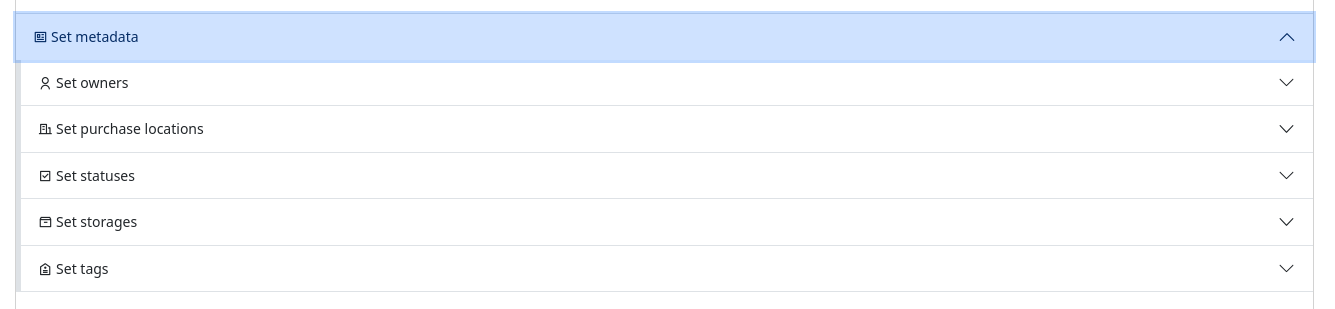
Values can be changed on the admin page:
Enhanced Parts Management
- Color information and transparency details
- Part relationships (prints, base parts)
- Damaged parts tracking
- Improved part visualization
- Minifigure part count calculation
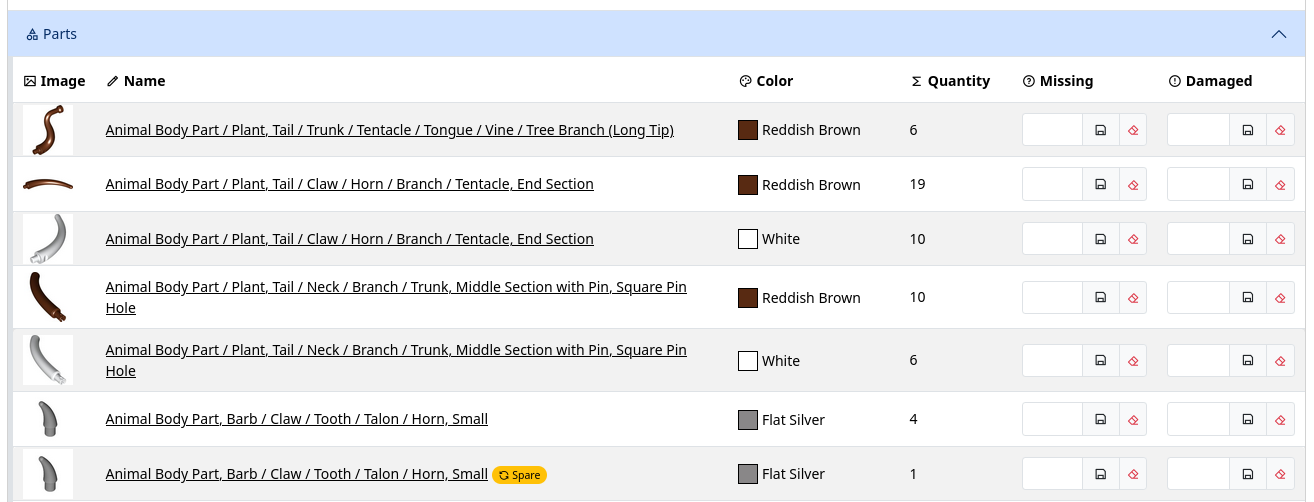
Show/hide missing and damaged parts can be controlled using environment variables.
Set Management
- New data refresh system for Rebrickable integration
- Enhanced wishlist management with set requesters
- Track who requested each set using the Details button
- Requesters can be selected from the available owners list
- Option to hide instructions
- Improved bulk operations

Note
In version 1.2.0, BrickTracker expands the data it stores from Rebrickable's API. Previously, it only saved essential information, but now it stores more data including part colors and relationships.
Sets from earlier versions need their data refreshed to access these new features. A new admin section shows which sets require updating.Important:
- Updates use Rebrickable API calls
- Update sets gradually to avoid API rate limits
- After refresh, you'll see enhanced part details like colors and relationships
The refresh process populates all the new data fields, enabling features like color-coded part listings and print relationships in your set details.

UI Improvements
- Clear search functionality
- Enhanced form interactions and error handling
Environment Variables
Note
For a complete list of environment variables and their usage, see variables overview.New Variables
BK_HIDE_TABLE_MISSING_PARTS: Hide Missing columnBK_HIDE_TABLE_DAMAGED_PARTS: Hide Damaged columnBK_SHOW_GRID_SORT: Show sort options by defaultBK_SHOW_GRID_FILTERS: Show filter options by defaultBK_HIDE_ALL_STORAGES: Hide Storages menuBK_STORAGE_DEFAULT_ORDER: Storage orderingBK_PURCHASE_LOCATION_DEFAULT_ORDER: Purchase location orderingBK_PURCHASE_CURRENCY: Purchase price currencyBK_PURCHASE_DATE_FORMAT: Purchase date format
Renamed Variables
BK_HIDE_MISSING_PARTS→BK_HIDE_ALL_PROBLEMS_PARTS
See Changelog for more information.
Downloads
- Edit your compose.yaml and change the version to
-
2025-01-27 19:35:36 +01:00 | 404 commits to master since this releaseWe are excited to announce version 1.1.1, which introduces a requested feature to download PDF instructions directly from Rebrickable. This update adds new functionality to both the instructions and set pages.
New Features
- PDF Instructions Download:
- You can now easily download PDF instructions for your sets directly from Rebrickable.
- A new Download instructions from Rebrickable button has been added to both the Instructions Page and the Set Page.
- A list of available instructions will be displayed, and you can select which ones to download.
- Please note that sets older than 20 years may not have available instructions for download.
Docker Update
- Docker Update:
- When using Docker, ensure you are pulling the image with the
1.1.1orlatesttag for the new release.
- When using Docker, ensure you are pulling the image with the
Downloads
- PDF Instructions Download:
-
2025-01-24 19:29:33 +01:00 | 424 commits to master since this releaseBrickTracker has made it to version 1.1.0, which is packed with improvements to deduplicate sets, enable custom checkboxes, and streamline database management. This update includes significant changes across the database, code, UI, and documentation to make the platform more robust and user-friendly.
Major Changes
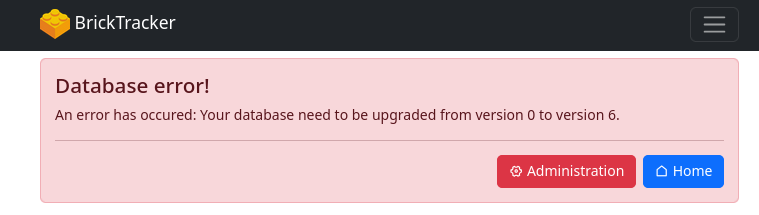
⚠️ Important: After updating to the latest version, the application will display a splash screen indicating a database error and prompting an update. This behavior is expected and part of the upgrade process.
-
On the splash screen, click "Administration."
-
Next, click "Upgrade the Database."
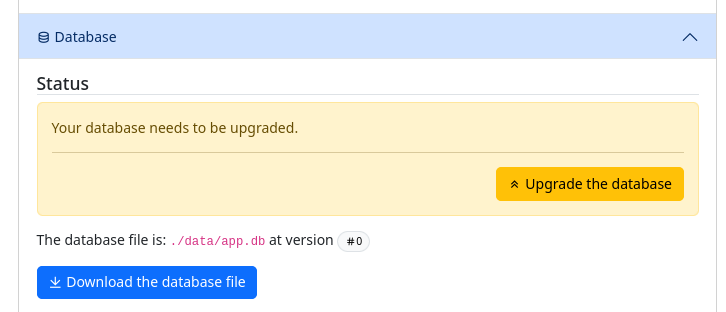
-
Before proceeding, it is strongly recommended to download a backup of the database to ensure your data is safe in case of any migration issues.
-
Finally, press "Upgrade the Database" to complete the process.
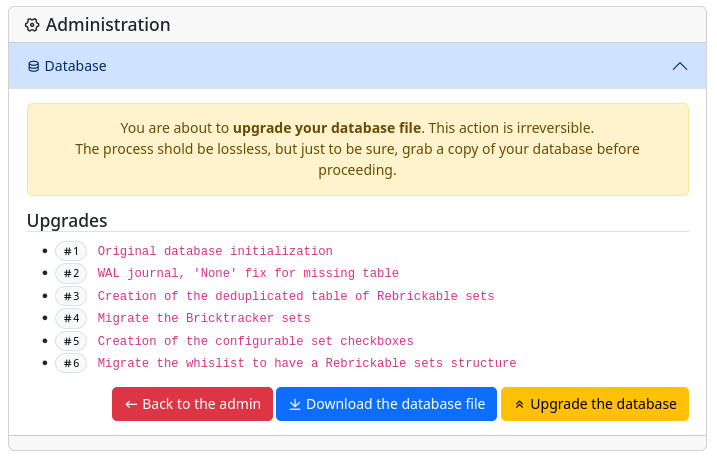
Following these steps will ensure a smooth transition to the updated database structure.
Highlights
Database
- Set Deduplication:
- Rebrickable sets are now unique in the database.
- Multiple BrickTracker sets can now map to a single Rebrickable set.
- Upgrade/Migration Tool: A smoother process for forward-only database migrations with checks for outdated versions.
Docs
- Removed unnecessary
<br>tags for better Gitea Markdown compatibility. - Added a comprehensive DOCS.md for easier navigation and setup guidance.
- Documented database upgrades and checkbox management.
Code Updates
This release introduces tighter, more efficient code with enhancements like customizable checkboxes, unified update routes, and deduplicated set handling. We’ve also improved SQL practices, streamlined database migrations, and refined the admin views for better maintainability. Key workflows and record processes have been consolidated, while stricter Python function definitions ensure robustness.
UI Enhancements
Checkboxes
- Toggle visibility of checkboxes in the grid while keeping them accessible in set details.
- Full management support for custom checkboxes.
Set Grid
- New filters to search by selected or unselected checkboxes.
Wishlist
- Added a Rebrickable link badge for sets (thanks @matthew!).
Database
- Integrated migration tools into the UI for seamless upgrades.
Tables
- Fixed table searches to properly index content inside link pills.
This release represents a significant step forward in performance, flexibility, and usability. Thank you to @gregoo's amazing work!
Downloads
-