Unraid Database Issue #111
Assignees
 FrederikBaerentsen
Clear assignees
FrederikBaerentsen
No Assignees


Notifications
Due Date
No due date set.
Dependencies
No dependencies set.
Reference: FrederikBaerentsen/BrickTracker#111
Reference in New Issue
Block a user
Delete Branch "%!s()"
Deleting a branch is permanent. Although the deleted branch may continue to exist for a short time before it actually gets removed, it CANNOT be undone in most cases. Continue?
Recently got back into building Legos and thought it would be fun to host my own collection on my Unraid server. Found this app and have been trying to get it running for a few days now. When I use the guides on the repo, I get a "Database error!
An error has occurred: unable to open database file." Not sure what I am doing wrong here. I have tried it both with the Unraid community applications option and docker compose with the same result. I am using default settings for the container and am not planning on using this outside my network with a reverse proxy. Any help would be appreciated!
Cheers
Revo
Could you share your compose file and your env?
Hi Frederik, thanks for getting back to me. I am using the unraid community applications option, so I'm not sure if I'm able to download the .env and compose files. I have attached a screen shot pdf of the setup. It installs fine, but I feel like I'm missing a step somewhere regarding the app.db file.
Thanks
Unfortunately the unraid template isn't made by me and isn't supported. Check #72 for more info. I don't know how unraid works.
Hi @FrederikBaerentsen
Same problem here
On start, bricktracker tells me to update database. But after upgrade, all sets have disappeared.
Here is my database if it helps
@bckthms are you using Unraid?
Which container tag are you using?
Yes, I am using Unraid with the latest version of gitea.baerentsen.space/frederikbaerentsen/bricktracker
Alright, unfortunately I don't use Unraid myself and have no idea how its container implementation is. I would suggest you contact whoever made the Unraid template, as that is not me.
I have the exact same issue.
Looks like the database is getting reset when we restart the container.
In the instruction for the database location, I can see : Path to the SQLite database. Run
touch app.dbBEFORE running container for the first time.Wondering if the touch app.db isn't run every time the container is restarted but I don't know where to find this.
I restarted the container because I am having difficulties when running the container in reverse proxy (nginx). if I do brick.domainname.com I get a web socket disconnect, but I don't have this issue when going to the ip/port directly. Any idea if it's related ?
seems for me, the last update moved my app.db location...
so i have to setup a new path variable in my unraid template config... to gave him the app.db at: "/app/data/app.db":"/mnt/user/appdata/$brick_tracker_somethingfolder$/app.db" (not "/app/app.db" anymore, like it is in the standarttemplate!)
I created a custom template for myself with only port and data path :
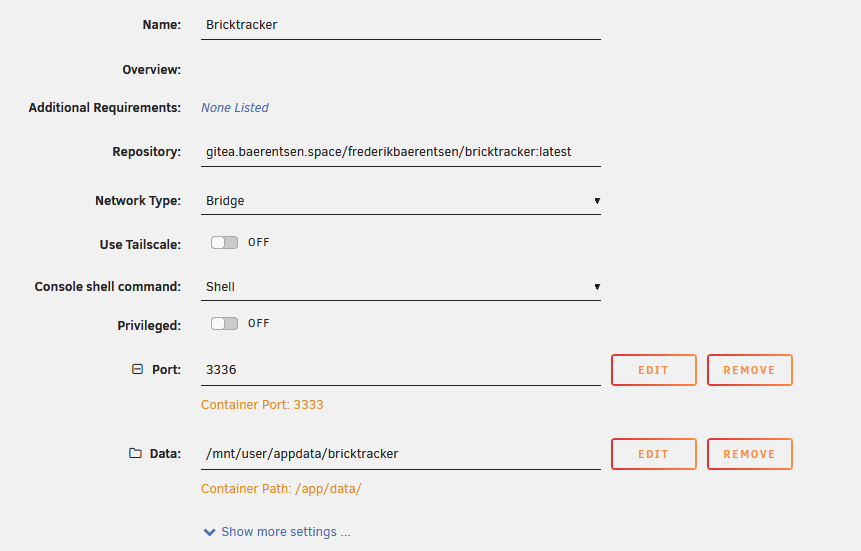
The app.db location is defined in the .env file (see migration guide)
Much easier to maintain !
I no longer have database problems after container update
Can you screenshot what your file structure looks like inside of your bricktracker data directory on your appdata share?
...Nevermind, I set mine up the same and now its working.